
Eyecon Caller ID & Spam Block: Features, Safety & How to Use
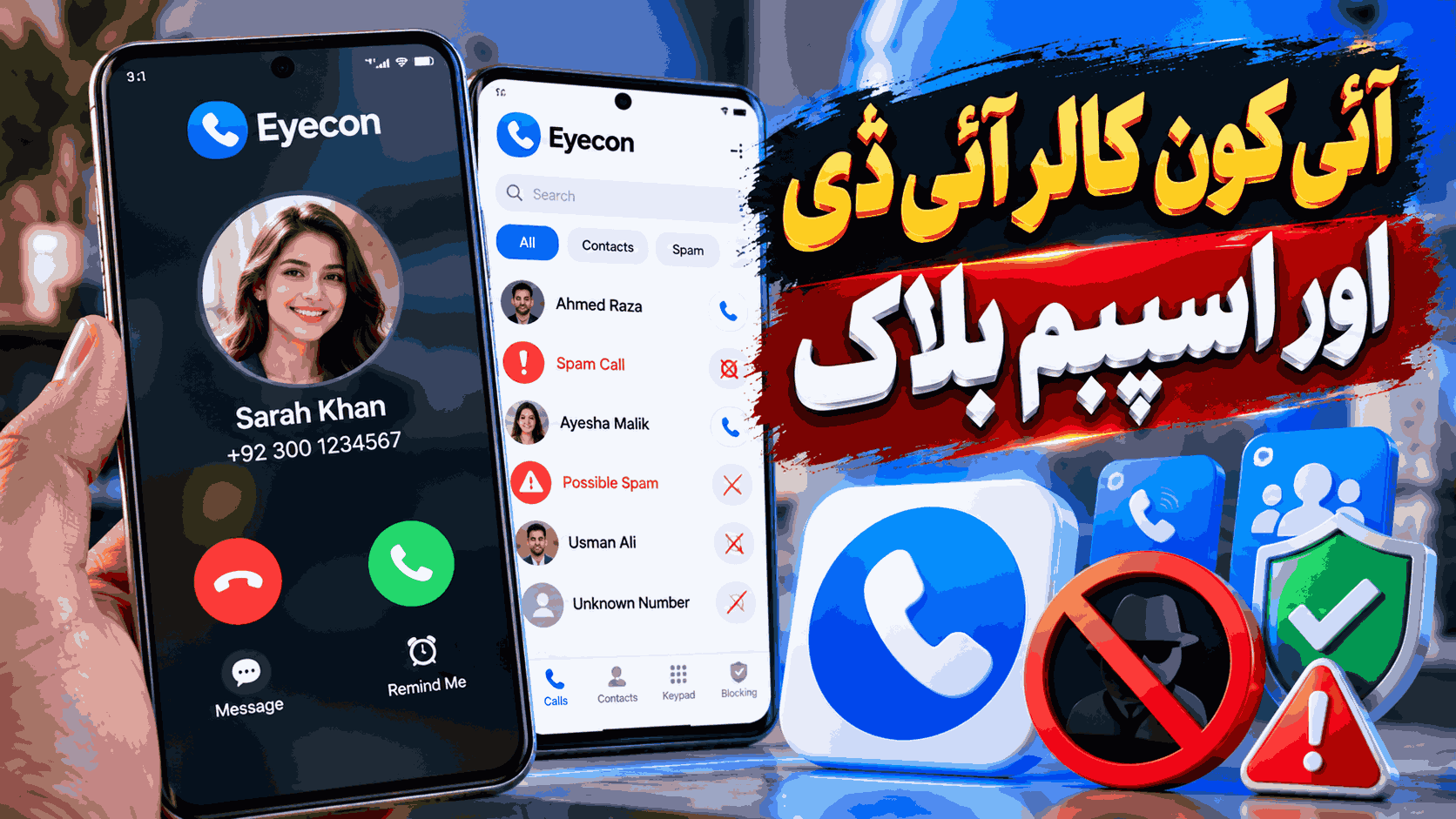
Eyecon Caller ID & Spam Block is an Android communication app designed to help users identify incoming callers, manage contacts, search unknown numbers, and block unwanted calls. It combines caller identification with a visual contact experience, spam protection, reverse lookup, and other phone-management features.
If you frequently receive calls from unknown numbers or unwanted callers, Eyecon can provide additional information before you decide whether to answer. This guide explains what Eyecon does, its main features, how to use its spam-blocking tools, privacy considerations, and what users should know before installing it.
Eyecon Caller ID & Spam Block at a Glance
| Feature | Information |
|---|---|
| App Name | Eyecon Caller ID & Spam Block |
| Developer | Eyecon Phone Dialer & Contacts |
| Primary Purpose | Caller identification, spam blocking, contacts and phone management |
| Platform | Android |
| Ads | Yes |
| In-App Purchases | Yes |
| Reverse Lookup | Yes |
| Spam Blocking | Yes |
| Caller ID | Yes |
App versions, device requirements, permissions and available features can change over time. Users should check the current Google Play listing and the application’s permission prompts before installation or enabling optional features.
What Is Eyecon Caller ID & Spam Block?
Eyecon is a caller ID and phone-management application that focuses on making incoming calls easier to understand. Instead of displaying only a phone number, its caller ID features can provide identifying information associated with a number when available.
The app also includes tools for identifying unknown numbers, reporting unwanted callers, blocking spam, organizing contacts and managing communication from a visual interface.
This makes Eyecon useful for people who want more information about an unfamiliar caller before answering the phone.
Key Features of Eyecon
1. Visual Caller ID
One of Eyecon’s main features is visual caller ID. The application can show a caller’s name and, where available, an associated photo. This can make it easier to recognize a caller without relying only on the phone number.
Visual caller identification is particularly useful when a number is not already saved in your address book.
2. Spam Call Blocking
Eyecon provides tools for blocking and reporting unwanted calls. Users can block individual numbers and report suspected spam through the app.
The official Eyecon support documentation also provides an option for blocking all calls identified as spam. Users can manage these settings through the application’s block list.
3. Reverse Phone Lookup
The reverse lookup feature allows users to search for information associated with a phone number. This can be useful when you have received a call from an unknown number and want to find out whether the number is recognized by the service.
Reverse lookup results should not be treated as guaranteed proof of a person’s identity. Phone-number information can be incomplete, outdated, or incorrectly associated.
4. Contact Management
Eyecon also focuses on visual contact management. The application can organize contacts and provide tools for navigating and managing a phone’s address book.
For users with a large contact list, features such as contact organization and duplicate management can make everyday phone use easier.
5. SMS and Communication Tools
Eyecon’s official feature information includes SMS-related functionality and additional communication tools. Depending on the device, operating system and enabled permissions, the available communication features may vary.
6. Backup
The official Eyecon feature list includes backup functionality designed to help users restore Eyecon-related information when moving to another phone or dealing with a lost or damaged device.
7. Dark Mode
Eyecon also provides a dark mode option. Dark interfaces can be more comfortable for some users, particularly when using a phone in low-light environments.
How to Identify an Unknown Caller With Eyecon
- Install Eyecon from the official Google Play listing.
- Open the application and complete its initial setup.
- Review the permissions requested by the app.
- Allow only permissions you are comfortable granting and that are necessary for the features you want to use.
- When an unknown call arrives, check the caller information provided by Eyecon.
- Use the available caller information to decide whether you want to answer the call.
Caller identification depends on the information available to the service. An unknown number may not always produce a name or photo.
How to Block Spam Calls With Eyecon
Eyecon provides tools for blocking and reporting spam numbers. According to the official support instructions, users can block or report a number from their call history.
- Open Eyecon.
- Go to your call history.
- Select the phone number you want to manage.
- Open the available options menu.
- Select the block or report spam option.
- Confirm the action when prompted.
Eyecon also provides a block list where users can manage previously blocked numbers. The exact interface may change between app versions.
How to Block All Spam Calls
If you want broader protection, Eyecon’s official support documentation describes an option for blocking all calls identified as spam.
- Open Eyecon.
- Open the application menu.
- Go to the block list.
- Open the block-list settings.
- Enable the option to block all spam calls.
Keep in mind that automated spam detection can make mistakes. A legitimate caller may sometimes be classified incorrectly, so important numbers should be reviewed carefully.
Is Eyecon Caller ID & Spam Block Safe?
Safety and privacy should be considered before installing any caller ID application because these apps may need access to communication-related information to provide their main functions.
Eyecon’s current privacy policy explains that certain call, messaging and address-book information may be processed for caller ID, dialer, reverse lookup, spam detection and block-list functionality. The policy also states that applicable processing depends on device permissions, operating system, local law and the features enabled by the user.
Before using Eyecon, review the permissions displayed by Android and the application’s current privacy policy. Avoid granting optional access if you do not need the associated feature.
Eyecon Permissions and Privacy Considerations
Caller ID and spam protection applications naturally interact with phone-related information. Depending on the features you enable, this can include information associated with calls, contacts or messaging.
A good privacy practice is to:
- Review permissions before granting access.
- Keep Android and the app updated.
- Use the official Google Play version rather than an unknown APK source.
- Review the application’s privacy policy.
- Disable features you do not need.
- Periodically check Android’s permission settings.
No caller ID service should be considered perfectly accurate. Information associated with a phone number can change, and spam databases can contain incorrect classifications.
Pros and Cons of Eyecon
| Pros | Cons |
|---|---|
| Visual caller identification | Contains ads on the free version |
| Spam call blocking tools | Some features may require additional permissions |
| Reverse phone lookup | Caller information may not always be accurate |
| Visual contact management | Premium features may require payment |
| Additional communication features | Feature availability can vary by device or region |
Eyecon Free vs Premium
Eyecon offers a free experience alongside premium functionality. The Google Play listing indicates that the application contains ads and in-app purchases. Eyecon’s official listing also describes premium access for features such as an ad-free experience and unlimited reverse lookups.
Because subscription offerings and pricing can change, check the current in-app purchase information before paying for a premium plan.
Common Problems With Eyecon
Caller ID Does Not Appear
Make sure the required permissions are enabled and that Eyecon is configured correctly. Android background restrictions, device settings, or operating-system changes can also affect caller ID behavior.
A Number Is Incorrectly Marked as Spam
Spam identification is not guaranteed to be perfect. If a legitimate number is incorrectly identified, review the available reporting options and correct the classification where supported.
Reverse Lookup Does Not Find a Number
Not every phone number will have a result. Reverse lookup depends on the information available to the service and the sources used for matching.
Blocked Calls Still Appear
Check Eyecon’s block list and Android’s phone settings. Also verify that the relevant blocking option is enabled and that the application has the permissions required for the feature.
Should You Use Eyecon Caller ID & Spam Block?
Eyecon can be useful for Android users who want caller identification, spam blocking, reverse lookup and visual contact management in one application. Its combination of caller ID and spam-management features makes it more than a basic phone dialer.
However, users should balance convenience with privacy. Caller ID applications may require access to communication-related information, so it is important to understand permissions and privacy practices before enabling features.
If your main goal is simply to identify unknown callers and reduce unwanted calls, Eyecon provides tools specifically designed for those tasks. If privacy is your highest priority, compare its permissions and data practices with the built-in phone features available on your Android device before making a decision.
Frequently Asked Questions
What is Eyecon Caller ID & Spam Block?
Eyecon is an Android communication application that provides caller ID, spam blocking, reverse lookup, contact management and other phone-related features.
Can Eyecon identify unknown callers?
Yes. Eyecon provides visual caller ID and reverse lookup features that can display identifying information for some unknown numbers when matching information is available.
Can Eyecon block spam calls?
Yes. Eyecon provides tools for blocking and reporting spam calls, including an option described in its official support documentation for blocking calls identified as spam.
Is Eyecon free?
Eyecon can be downloaded and used with a free experience, but the Google Play listing indicates that it contains ads and offers in-app purchases. Some advanced features may require premium access.
Does Eyecon support reverse phone lookup?
Yes. Reverse lookup is one of Eyecon’s advertised features and allows users to search for information associated with a phone number.
Is Eyecon safe for privacy?
Eyecon publishes a privacy policy explaining how information may be processed for caller ID, reverse lookup, spam detection and related features. Users should review the current policy and Android permissions before enabling the application.
Why does Eyecon need phone permissions?
Caller ID, call history, contact management and spam-blocking features may require access to communication-related information. The permissions requested can depend on the Android version and features you enable.
Can Eyecon identify every unknown number?
No. Caller identification and reverse lookup depend on available information, so some numbers may not have a matching name, photo or other identifying information.
Conclusion
Eyecon Caller ID & Spam Block is a feature-rich Android communication app focused on identifying callers, managing contacts and reducing unwanted calls. Its main tools include visual caller ID, reverse lookup, spam blocking, contact management and additional communication features.
For the best experience, install the official version, review permissions carefully, keep the app updated, and use its spam-reporting tools responsibly. Most importantly, remember that caller identification is not guaranteed to be completely accurate, so important decisions should not rely on a caller ID result alone.
“`